
Your first launch
Anyone can create a token on GAMA. You fill in one form, check the preview and approve one transaction. The token starts trading on its own bonding curve in the same transaction. This page walks you through it; Create a launch explains every field in more depth.
You need a connected wallet on GIWA Sepolia with enough test ETH for the creation fee of 0.00078 ETH, plus any opening buy, plus gas.
Fill in the form
Click Create in the header. The page Create a token has the form on the left and a Token preview on the right.
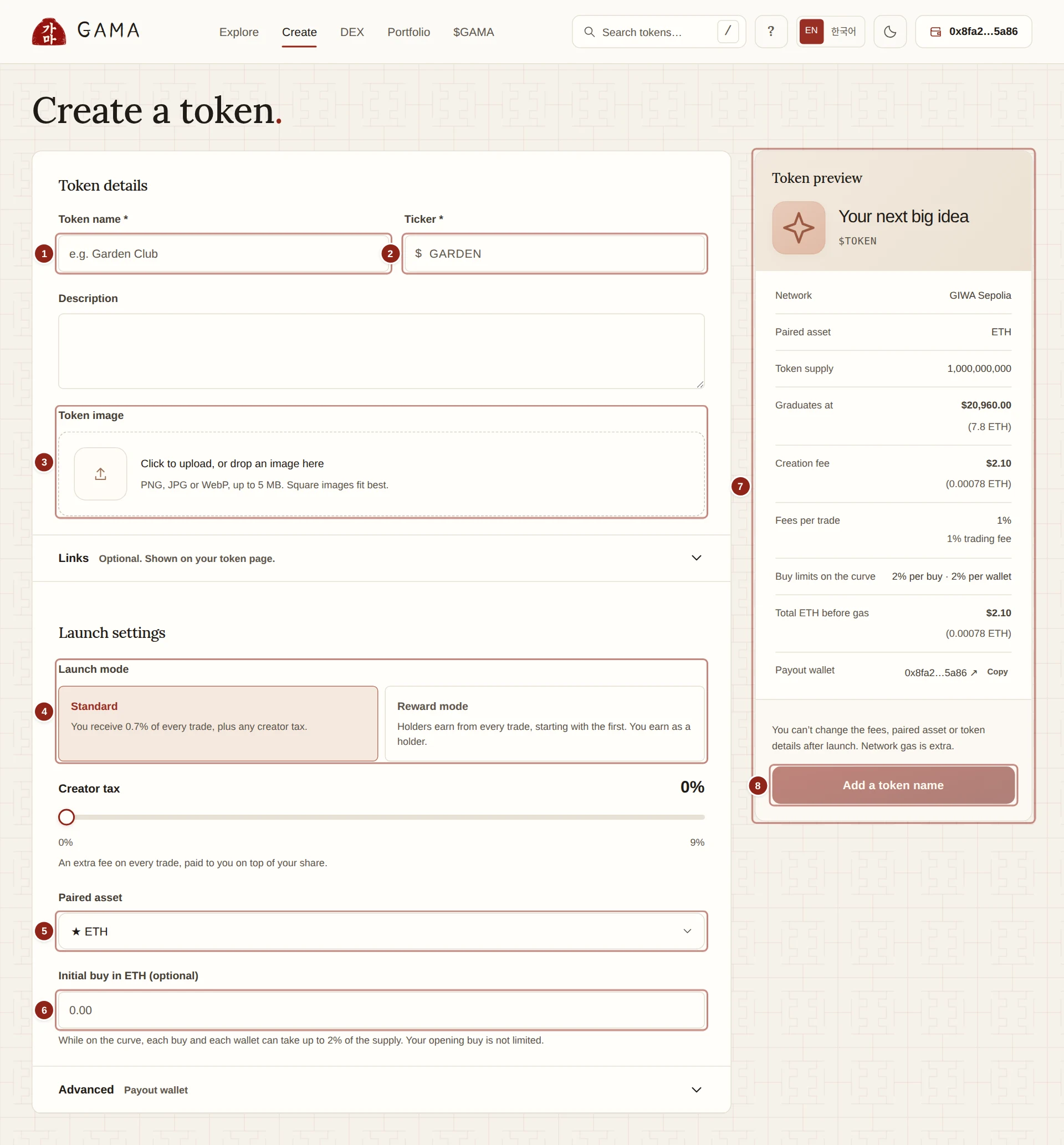
- Token name: the full name, up to 64 bytes.
- Ticker: the short symbol, up to 16 bytes.
- Token image: a PNG, JPG or WebP image up to 5 MB.
- Launch mode: Standard or Reward mode.
- Paired asset: what the token is priced in. ETH is the default.
- Initial buy: an optional first purchase, made in the launch transaction.
- Token preview: the exact terms your launch will have.
- Launch token: sends the launch to your wallet.
Token details
- Token name and Ticker are required. Korean characters take more bytes than Latin letters, so the form counts bytes when you get close to the limit.
- Description is optional, up to 2,048 characters. It appears on your token page.
- Token image: click to upload, or drop an image on the box. Square images fit best.
- Links (optional): a website, X, Telegram, Discord and Farcaster. You can type a handle or a full address. Your token page shows each link under the app's own label, with the site it leads to.
Launch settings
Launch mode. Choose one:
- Standard: you receive 0.7% of every trade (70% of the 1% trading fee), plus any Creator tax you set with the slider, from 0% to 9% in steps of 0.5%.
- Reward mode: every trade pays a Holder fee of 1% to 4%, which holders share in the paired asset from the very first trade. You receive no creator fee and earn only as a holder.
Paired asset. ETH is the default and is starred. GAMA, also starred, and other tokens that have graduated on GAMA can be chosen too. The preview shows the token's graduation target in that asset. See Pair tokens.
Initial buy in ETH (optional) (or in your paired asset). Type an amount to buy your own token in the same transaction as the launch, so nothing can trade before you. The form shows "You get exactly …" tokens. The opening buy is not limited by the 2% buy limits. A buy large enough to empty the curve graduates the token at once, and you get back what it does not need. See Opening buy.
Advanced › Payout wallet (optional): the wallet that receives your creator earnings. Leave it empty to use the connected wallet.
Check the preview
The Token preview updates as you type. Check each line before you launch:
- Network: GIWA Sepolia.
- Paired asset and Token supply: 1,000,000,000 tokens, always.
- Graduates at: the amount the curve raises when it sells out, 7.8 ETH for an ETH-paired token.
- Creation fee: 0.00078 ETH, paid in ETH whatever the paired asset.
- Fees per trade: for example "1% trading fee + 2% creator tax", or "1% to GAMA, 1% to holders, from the first trade".
- Buy limits on the curve: "2% per buy · 2% per wallet" by default.
- Total ETH before gas: the creation fee plus an ETH opening buy.
- Payout wallet: where creator earnings go.
If the anti-snipe tax is switched on for new launches, the preview also shows Anti-snipe tax. It is off by default.
WARNING
You can't change the fees, paired asset or token details after launch. Check the name, ticker and image carefully: a launch cannot be edited or deleted.
Launch
- Click Launch token. Until the form is complete, the button says what is missing, such as Add a token name or Not enough balance.
- While Getting ready… shows, the app works out an address for your token that ends in
100. Every GAMA token's address does. - If your paired asset is not ETH and you set an initial buy, your wallet first asks you to approve that exact amount.
- Confirm the launch transaction in your wallet. It carries the creation fee and any ETH opening buy.
- When it is confirmed, Open your token takes you to your new token page.
Just before sending, the app compares the terms with the preview you saw. If anything changed in between, for example a default fee, you see "Launch terms changed. Review the updated preview and retry." and nothing is sent.
Here is a standard launch created in the current release, as it looks on Gamascan.
After the launch
Your token trades on its curve straight away. Share its page: gama.win/launchpad/token/ followed by its address. Watch its Curve progress on the token page; when the curve has raised its target, the token graduates into its own pool on GAMA DEX, with its liquidity locked for good. See After the launch.
In standard mode, your share of every trade is paid to your payout wallet automatically about every five minutes once it passes a minimum, less a charge of at most 1%. You can also claim it yourself at any time for only the gas. Portfolio › Creator earnings shows it. See Creator earnings.
TIP
In reward mode, the holder fee on trades in your launch's first block goes to GAMA, because no one has held the token for a full block yet. Your opening buy starts earning from the next block, like everyone else's tokens.