
After your launch
Once your launch confirms, your token trades on its bonding curve until the curve sells out. Then it graduates: the curve closes and everything it raised becomes permanently locked liquidity in a GAMA DEX pool. This page follows that path and shows what you see at each stage.
Your token page
Open your token takes you to your token's page. Its web address ends in the token's own address, so you can share the link. The header shows the name, the ticker and a stage tag: On curve, Graduating or Graduated. A reward launch also has a Reward mode tag. For every part of the page, see The token page.
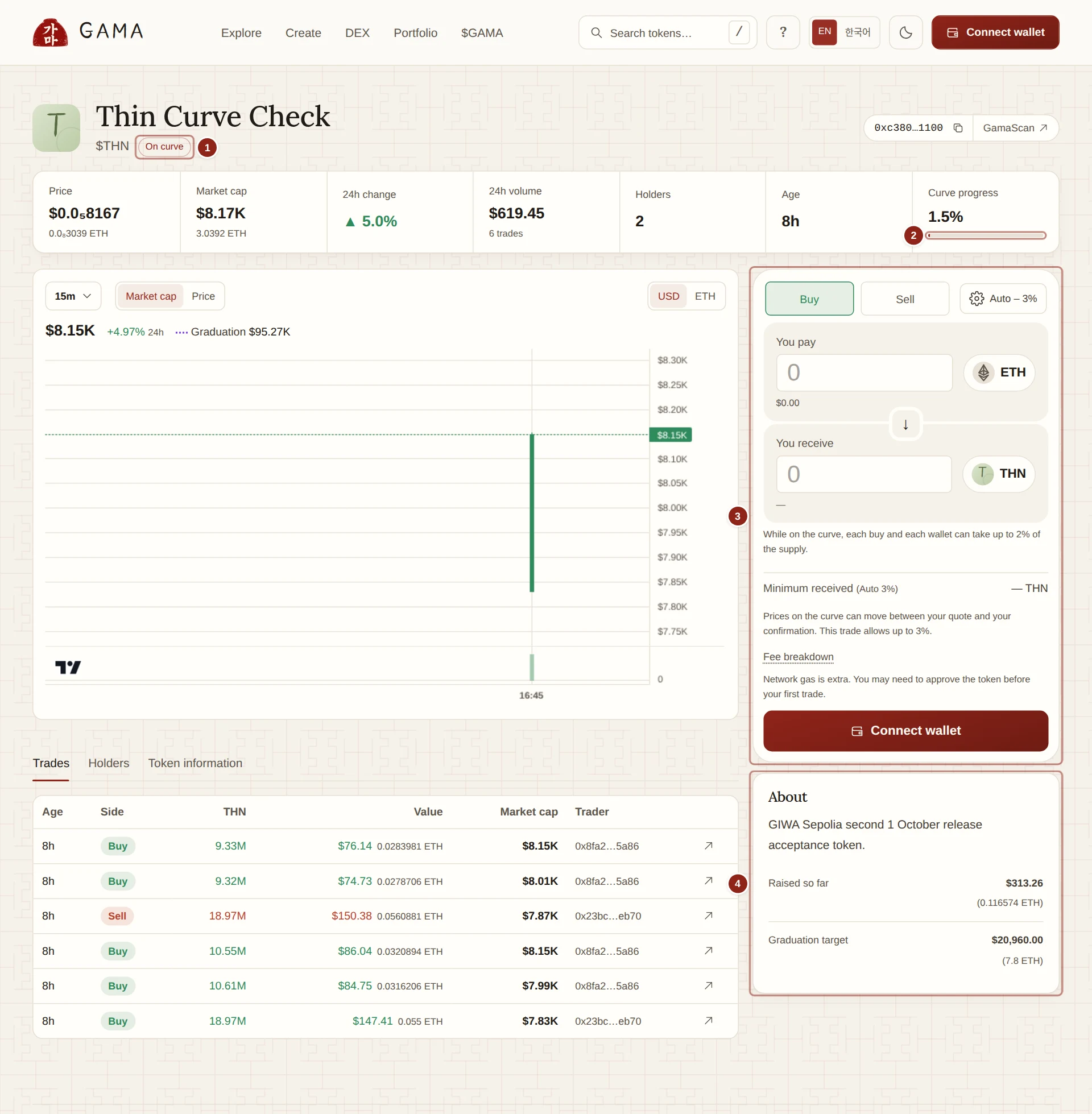
- Stage: On curve, Graduating or Graduated.
- Curve progress: how much of the graduation target the curve has raised.
- Buy / Sell: where anyone trades the token.
- About: the description, links, Raised so far and Graduation target.
While the token is on its curve
Anyone can buy from and sell to the curve, and its price rises as tokens are sold. Curve progress is the share of the target raised so far; the About card shows the same as Raised so far and Graduation target. There is no deadline: the curve stays open until it sells out.
- Your fees start with the first trade on a standard launch, and holder rewards start with the first trade on a reward launch.
- Each buy and each wallet are limited to 2% of the supply. See Buy limits.
- Nobody can put your token into a GAMA DEX pool before it graduates. The token refuses to be sent into GAMA DEX until its own pool is set up, so its only market on GAMA is the curve. Other DEXes outside GAMA cannot be restricted this way.
Graduation
A launch graduates when its curve has sold all 780,000,000 tokens on sale, which is when it has raised its target: 7.8 ETH for an ETH launch. It happens inside the buy that takes the last tokens. If that buy is larger than what is left, the buyer gets the remaining tokens and the rest of the payment back.
In that same transaction:
- The curve closes for good. No more curve trades are possible.
- Everything the curve raised, together with the 220,000,000 tokens it never sold, goes into the token's GAMA DEX pool as one position covering the full price range.
- The pool opens at the curve's last price, so the price does not jump at graduation.
- GAMA's locker takes the position and holds it permanently. Nobody can withdraw it, GAMA's admin included.
- Trading continues in the pool, through the same Buy / Sell panel, with no buy limits. The fees stay exactly the same.
There is no graduation fee. You can see a graduation on GAMASCAN in the buy that graduated GAMA.
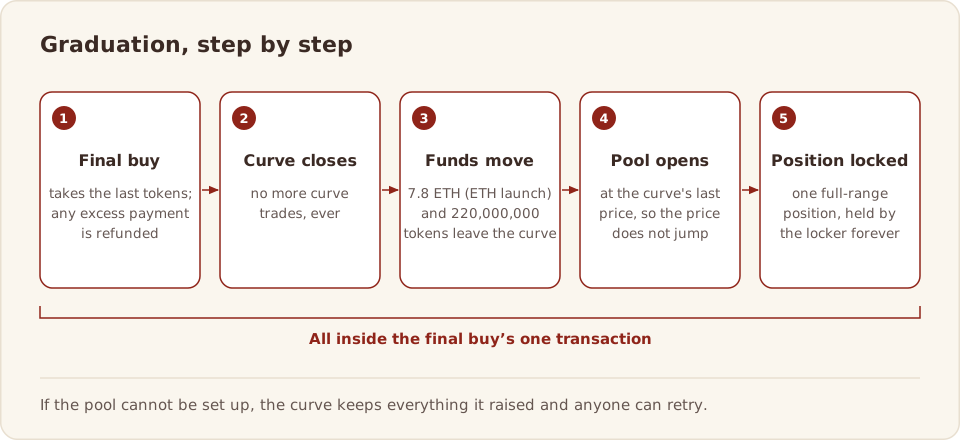
The final buy needs more gas than an ordinary buy, because it also creates the pool. If a wallet sends it with too little, it fails and nothing changes; the app says "This buy completes the sale and needs more gas to graduate the token. Please retry."
If graduation does not finish
Rarely, the curve sells out but setting up the pool does not complete. The token then shows Graduating, and the trade panel is replaced by a Finish graduation or Complete graduation card. Anyone can press the button; it costs only network gas. Until then the funds stay held for the launch. Nobody can withdraw them instead, and the sale never reopens.
After graduation
- The stage tag reads Graduated, and Liquidity replaces Curve progress.
- The About card shows Locked liquidity, with the note "Graduated liquidity is permanently locked."
- Under Token information, Contracts and locked position lists the pool and the locked position.
- Your token can now be the paired asset of new launches.
- Fees from pool trades reach you, or the holders, the same way as before. See Creator earnings and Holder rewards.
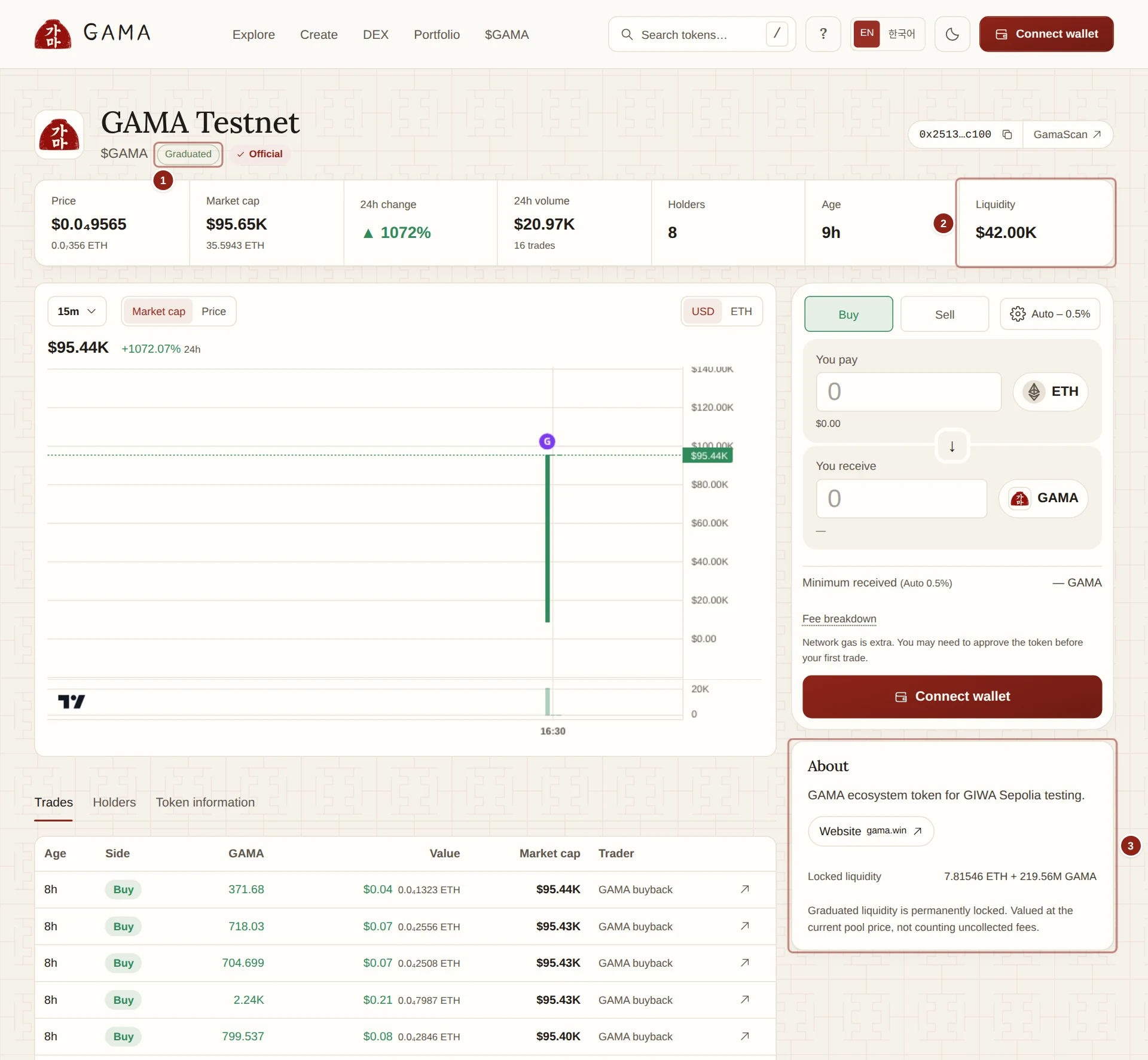
- Graduated: the curve has closed and the token trades in its pool.
- Liquidity: the value of the locked position at the current pool price.
- Locked liquidity: what the locked position holds, in both assets.
The locked position covers the whole price range, so the pool can always be traded. The only way it can ever move is a guarded migration to another approved GAMA DEX venue, which locks it again in the same transaction. See Locked liquidity.
What you can still do as the creator
You cannot change the token's name, image, links, mode, fees or paired asset. In Portfolio, under Creator controls, you can follow each of your tokens, burn tokens you hold and redirect your creator fees to another wallet. Creator earnings shows what you have earned and been paid. See Creator controls and earnings.