
Creator controls and earnings
Two views in Portfolio are for creators. Creator earnings shows the fees credited to your wallet and how they were paid. Creator controls lists the tokens whose fees come to your wallet, with their figures and two actions: burning tokens and redirecting the fees.
Creator earnings
Select Portfolio, then Creator earnings. The view lists every fee credit your connected wallet has in GAMA's fee contract: creator fees from your standard launches, and any other share of fees paid to the wallet.
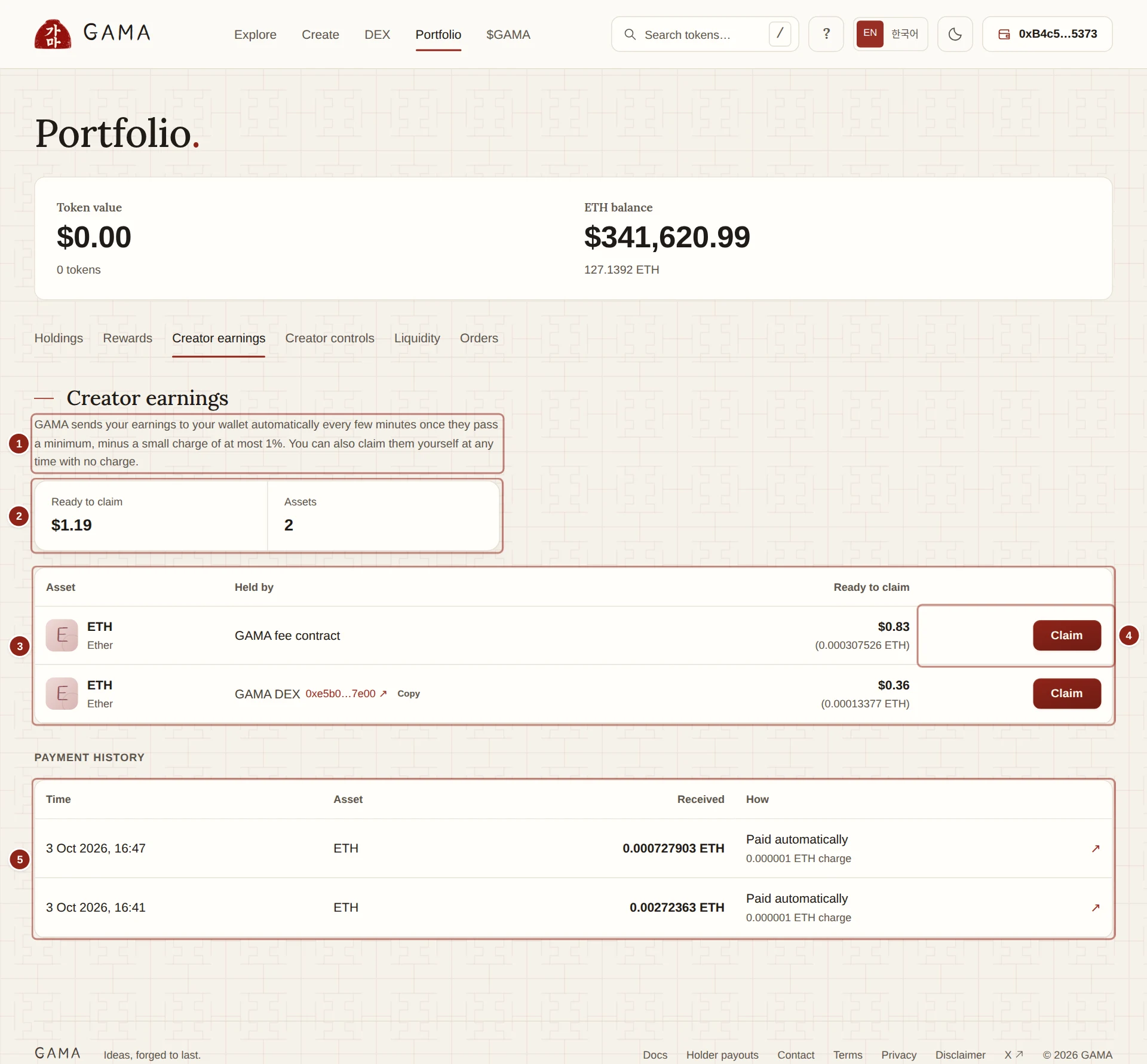
- Payout note: whether GAMA is paying your earnings automatically.
- Ready to claim: the dollar value of everything waiting, and in how many assets.
- Held by: where each balance waits: the GAMA fee contract, or GAMA DEX for fees from pool trades.
- Claim: pays that balance to your wallet now, with no charge.
- Payment history: every automatic payment and claim.
1. Payout note
When automatic payouts are on, the note reads: "GAMA sends your earnings to your wallet automatically every few minutes once they pass a minimum, minus a small charge of at most 1%. You can also claim them yourself at any time with no charge." If they are paused for an asset, it says so, and you can claim.
2. Ready to claim
Ready to claim adds up what is waiting, in dollars. Assets counts the assets it is in, for example ETH and GAMA.
3. Held by
Each row is one asset in one place. GAMA fee contract holds fees from curve trades. GAMA DEX, followed by the pool contract's address, holds fees from pool trades after graduation. Each row is paid separately.
4. Claim
Claim pays the row's whole balance to your connected wallet, with no charge; you pay only the gas. If your wallet refuses plain ETH, the app offers Receive WETH instead of ETH.
5. Payment history
Every payment of your credits, newest first: Time, Asset, Received and How. Paid automatically shows the charge below it, for example "0.000001 ETH charge"; Claimed has none. The arrow opens the transaction on GAMASCAN. Amounts are shown in the asset only, never at today's price.
If nothing is waiting, the view says "Nothing waiting right now." Holder rewards are not here; they are under Rewards.
Creator controls
Select Portfolio, then Creator controls. The view lists the tokens whose fee wallet is your connected wallet: the tokens you launched, unless you set another payout wallet or have redirected the fees. A token whose fees you redirect moves to the new wallet's list.
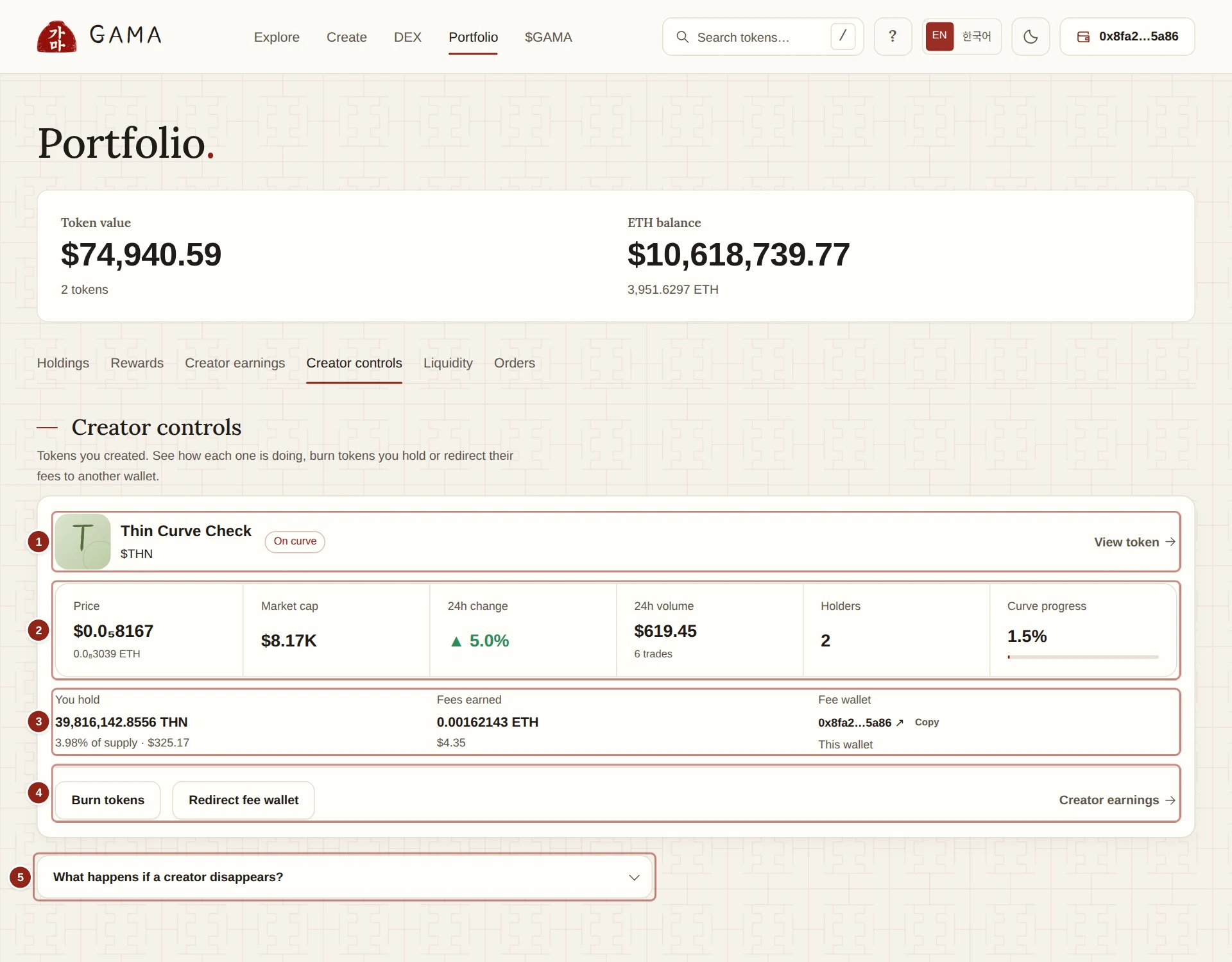
- Token: name, stage tag and a link to the token's page.
- Figures: price, market cap, 24-hour change and volume, holders, and curve progress or graduation.
- You hold, Fees earned, Fee wallet: your balance, what the token has earned you and where its fees go.
- Burn tokens and Redirect fee wallet: the two actions.
- What happens if a creator disappears?: how GAMA's admin can replace a token's creator.
1. Token
The token's name and $ticker, its stage (On curve, Graduating or Graduated), a Reward mode tag where it applies, and View token.
2. Figures
Price, Market cap, 24h change, 24h volume, Holders, and Curve progress while the token is on its curve or Status: Graduated after.
3. You hold, Fees earned, Fee wallet
- You hold: your balance of the token, its share of the supply and its dollar value.
- Fees earned: the creator fees this token has credited to your wallet, valued at the time of each trade. A reward-mode token reads "Reward tokens pay no creator fee. Holders earn instead."
- Fee wallet: the wallet that receives the token's creator fees, marked This wallet when it is yours.
4. Burn tokens and Redirect fee wallet
Burn tokens sends tokens you hold to the dead address, where nobody can ever move them. Enter an amount, or choose 25%, 50% or Max, then Review burn and confirm. The total supply does not change, but burned tokens no longer count in the circulating supply or the market cap. This cannot be undone.
Redirect fee wallet sends the token's future creator fees to another wallet. Enter the New fee wallet, then Review redirect: the dialog shows From and To. The change happens at once. Fees already earned stay with your wallet, and only the new wallet can redirect the fees again. See Creator earnings.
WARNING
Check the new address before you confirm a redirect. You cannot undo it from your wallet afterwards.
5. Planned creator changes
GAMA's admin can move a token's fee wallet to someone new, for example after a community takeover, with three days' public notice. If a change is planned for one of your tokens, its card shows Planned creator change, the window in which it can happen and the New creator wallet. Redirecting the fee wallet yourself does not stop it. See Creator earnings.