
Your rewards
The Rewards view in Portfolio shows the holder rewards your wallet earns from reward-mode tokens: what you have received, what is waiting, and every payment. To open it, select Portfolio in the header, then Rewards. The old address gama.win/launchpad/rewards opens it too.
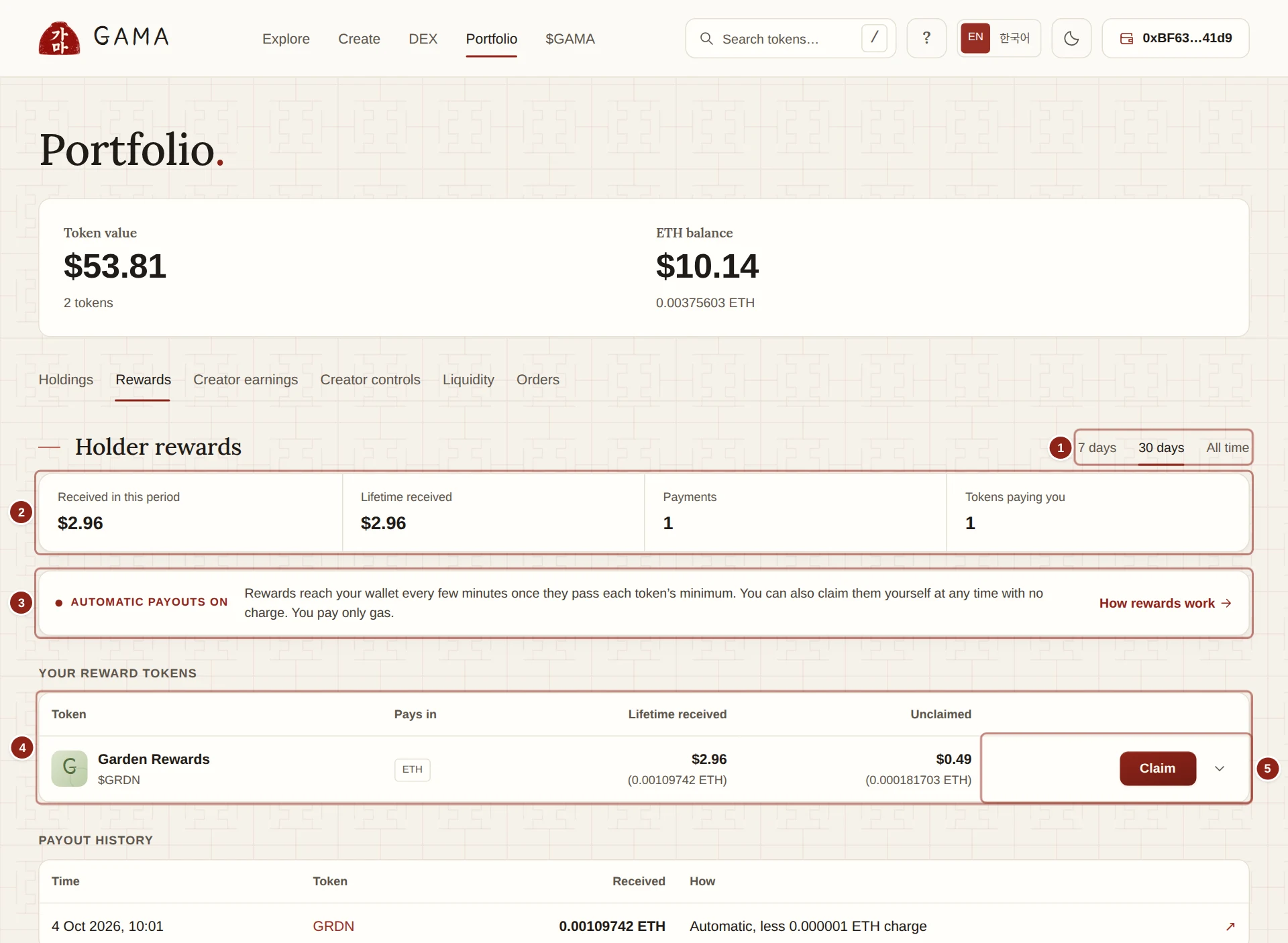
- Period: 7 days, 30 days or All time.
- Totals: what you received in the period and in total, the number of payments and how many tokens pay you.
- Automatic payouts: whether GAMA is paying your rewards automatically right now.
- Your reward tokens: each reward-mode token you hold or held, with what it paid and what is waiting.
- Claim: pays what is waiting to your wallet now, with no charge.
1. Period
7 days, 30 days or All time sets the period for every total except Lifetime received.
2. Totals
- Received in this period (or Received, all time): what reached your wallet in the period, in dollars.
- Lifetime received: everything you have received, in dollars.
- Payments: how many payments you received in the period.
- Tokens paying you: how many tokens paid you in the period.
Each payment is valued in dollars at the time it was made, not at today's price.
3. Automatic payouts
The line under the totals says Automatic payouts on, Automatic payouts on for some assets or Automatic payouts paused, with a sentence on what that means for you. When payouts are on, "Rewards reach your wallet every few minutes once they pass each token's minimum." When they are paused, your rewards stay yours and you can claim them. How rewards work opens the explanation. See Payouts and claims.
4. Your reward tokens
One row for each reward-mode token your wallet holds, or has held or claimed from:
- Token: name and $ticker, linked to the token's page.
- Pays in: the asset the token pays rewards in, its paired asset.
- Lifetime received: everything this token has paid you, in its asset, with the dollar value at the time.
- Unclaimed: what is waiting for you now.
The arrow at the end of a row opens Reward details: the token's automatic payout terms, for example "GAMA sends your rewards automatically once at least 0.0005 ETH is waiting. Each automatic payment deducts a charge of up to 0.000001 ETH (1%) to cover its cost. Claim here instead to pay no charge, only your own gas."
5. Claim
Claim sends everything waiting on that token to your connected wallet, with no charge. You pay only the gas. Two things can come first:
- If the token's liquidity has moved to a new pool, the row says "This token moved to a new pool. Move your rewards over from the old pool first, then claim." Select Move from old pool, then Claim.
- If your wallet refuses plain ETH, the claim fails and the app offers Receive WETH instead of ETH.
If GAMA's admin has stopped your wallet from earning a token's future rewards, its row says so. What you earned before stays claimable.
Payout history
Payout history lists every reward payment to your wallet, newest first:
- Time: when it was paid, in your own time zone.
- Token: the token that paid it.
- Received: the amount, in the asset you received. A past payment is shown in units only, never at today's price.
- How: Claimed, Automatic, or Automatic, less 0.000001 ETH charge, for example.
- The arrow opens the transaction on GAMASCAN.
If you have no reward tokens yet, the view says "No reward tokens yet." and links to Explore tokens.
TIP
The rewards of tokens held in an order vault are claimed from the vault, under Orders, not here. See Your orders.