
Token approvals
An approval lets a contract move one of your tokens, up to a set amount. GAMA's contracts need one before they can take a token from your wallet for a trade, a deposit or an order. This page lists every approval the app asks for, explains why each is for an exact amount, and shows how to check and revoke approvals.
Two steps, one action
When an action spends a token other than ETH, your wallet may show two requests: first the approval, then the action itself. An approval on its own trades nothing. If you reject the second step, nothing is traded, but an approval you already confirmed stays in place.
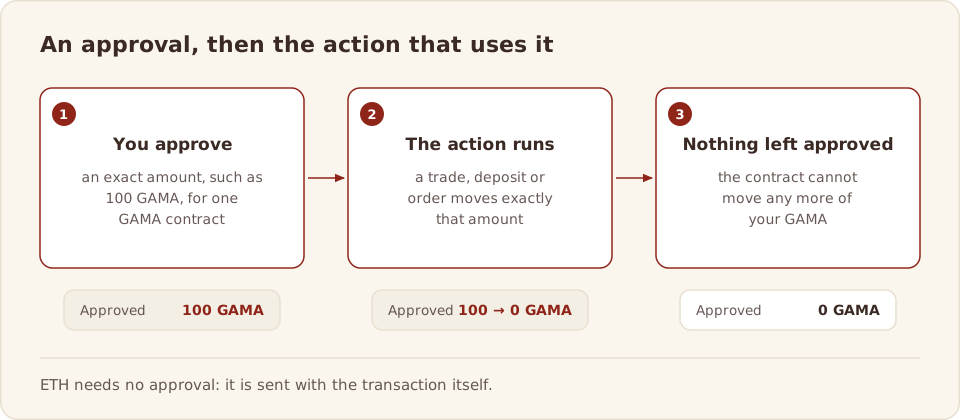
ETH needs no approval: it is sent with the transaction.
What the app asks for
The app always asks for exactly the amount the action needs, never an unlimited amount, and only when your current approval for that contract is too small. In most cases the action then uses the whole approval, so nothing is left approved.
| Action | Contract you approve | Amount |
|---|---|---|
| Buy or sell a launch token on its curve | That launch's own curve | Exactly the amount you pay or sell |
| Any other swap in a GAMA DEX pool, including a graduated launch's pool | The launch swap router | Exactly the amount you pay, or the most you pay when you ask for an exact amount out |
| A swap along a route through several launches or pools | The trade router | Exactly the amount you swap |
| Add liquidity | Permit2, which then lets the position manager use that amount | Exactly the most you deposit; Permit2's own approval ends after 20 minutes |
| Place a limit or DCA order | The order book | Exactly the order's whole budget, moved into your order vault when you place it |
| Create a launch with an opening buy in a token other than ETH | The launch factory | Exactly the opening buy |
A few tokens refuse to change an approval from one amount to another. For those, the app first sets the approval to zero, so your wallet shows one extra request.
TIP
Your wallet shows the spender and the amount before you confirm. If a request on gama.win asks for an unlimited amount, or names a contract that is not on Contracts, reject it.
Check and revoke approvals
Approvals stay in force until they are used or changed. To see every approval your address has given, open your address on Gamascan and choose the Token Approvals tab, at gamascan.io/address/<your address>/approvals. It lists each token, its spender, the amount still allowed and whether it is active.
To revoke one, you send a transaction from your own wallet that sets the approval back to zero, and pay a small fee in test ETH. Gamascan's Write Contract tab on the token can do this; Gamascan's guide Token approvals: check and revoke has the steps.
WARNING
An approval signed on a fake site lets a scammer take that token later without asking again. Use GAMA only at gama.win, and revoke any approval you do not recognise. See Scams and fake sites.
Related
- Scams and fake sites
- Contracts
- Add and remove liquidity
- Risky approvals in the Gamascan docs