
Swapping
DEX › Swap trades one token for another in a single transaction. It reaches every GAMA token, whether it is still on its bonding curve or already in its pool, and ordinary GAMA DEX pools too. With no token chosen, the swap card is set to buy GAMA.
Make a swap
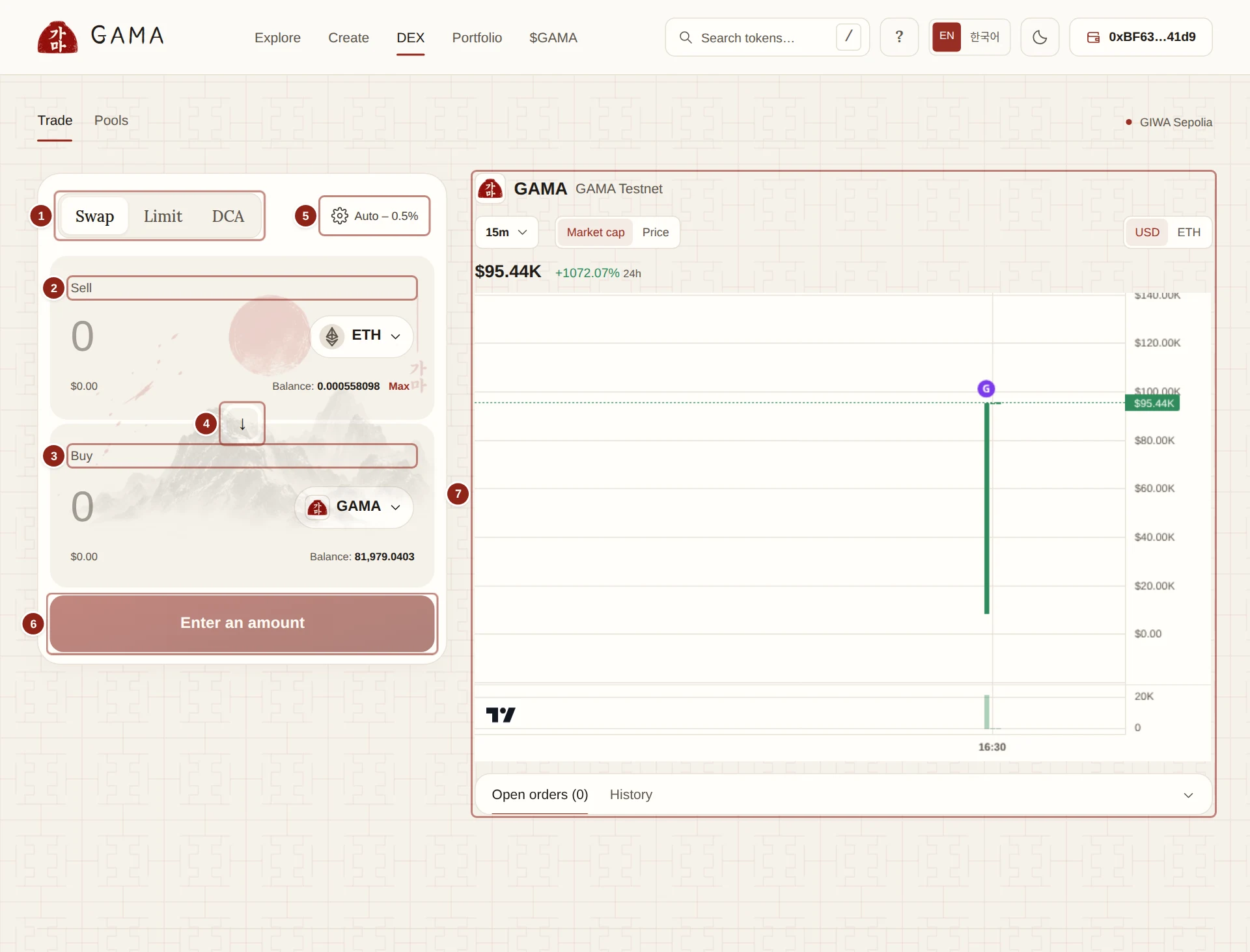
- Swap, Limit, DCA: the card's three modes.
- Sell: what you pay, with your balance and Max.
- Buy: what you receive.
- The arrow: swaps the two sides.
- The slippage button: Auto or your own setting.
- Review swap: opens the summary before your wallet.
- The chart of the launch you are trading (GAMA until you choose another), with your orders below it.
- Open DEX. The Trade view opens with Swap selected.
- In Sell, click the token button and choose what you pay. ETH is the default. In Buy, choose what you receive. Select token lists ETH, WETH, every GAMA token (those still on their curve are marked On curve) and every token in a GAMA DEX pool. Type a name to search, or paste an address to import another token; check its address before trading it.
- Type an amount in Sell, or click Max. You can type in Buy instead to receive an exact amount; GAMA works out what you pay.
- Wait for the quote. A line such as "1 ETH ≈ … GAMA" appears, with Minimum received and Slippage.
- Open Route and fees to check the route, the fees and the price impact (see below).
- Click Review swap. The window shows You pay, You receive, Minimum received and Slippage, with Details.
- Click Confirm swap and approve in your wallet. When you pay with a token rather than ETH, your wallet may first ask for one or two approvals, each for exactly the amount you are paying and nothing more.
- When the swap is done the button reads Swap complete.
Choosing ETH on one side and WETH on the other turns the card into Wrap ETH or Unwrap WETH, which simply converts one into the other.
How the route is chosen
GAMA picks the route for you. You see it under Route and fees as a line of tokens, such as ETH → GAMA → your token.
- Tokens on their curve. When the route reaches a token still on its bonding curve, the trade goes through the curve itself, in the same transaction, with the curve's fees and buy limits. A path can take up to four steps, mixing curves and pools: for example, paying ETH for a token priced in GAMA buys GAMA in its pool and then the token on its curve.
- Graduated tokens. A graduated token trades in its own pool, the one its locked liquidity sits in. If that liquidity ever moves to another approved pool, the swap follows it.
- Other tokens. Swaps between ordinary tokens use GAMA DEX pools and can be split across several routes to get a better price. Route and fees shows each route's share.
A route through a curve takes exact input only: if you type in Buy, GAMA works out the amount to pay and the trade uses that amount. If the last step is a buy that empties a curve, you get back what it did not need: "This buy completes the launch sale. About … is not needed and stays with you."
What Route and fees shows
- The route and, for each step, whether it uses a bonding curve or a pool, what it delivers and, on a curve, its fees.
- Pool fees for each pool on the route: a launch's trading fee and creator tax or holder fee, any liquidity provider fee and any DEX protocol fee, and the Total per trade.
- Price impact, including fees: how much worse your average price is than the market price.
- Estimated network fee: the gas the swap should use. Your wallet shows the final network fee; approvals and the L1 data fee cost extra.
Two notes can appear: "Network fees couldn't be priced, so routes are compared on token amounts only", and "Not every pool could be checked, so a better route may exist".
TIP
Buy limits apply to swaps that buy a token on its curve, just as on the token page. The card shows your room ("You can buy up to … more") and reduces a Buy amount to your limit when you type more.
When a swap fails
A swap fails, and changes nothing, when the price moves past your Minimum received before it lands, or after a deadline of 20 minutes. You still pay the network fee. The quote refreshes by itself while the card is open; wait for a fresh one and try again, or raise the slippage a little. See Slippage and price impact.
"No route found. Try another token or amount." means no pool or curve connects the two tokens at that size.