
Your holdings
Portfolio gathers everything your connected wallet has on GAMA: the tokens you hold, your rewards, what you earn as a creator, your liquidity and your orders. This page covers the summary at the top and the Holdings view.
Open your portfolio
Select Portfolio in the header. Without a connected wallet, the page says "Connect your wallet to see your portfolio." and offers the wallet button. Portfolio only reads public data about your address; it never moves anything without a transaction you confirm in your wallet.
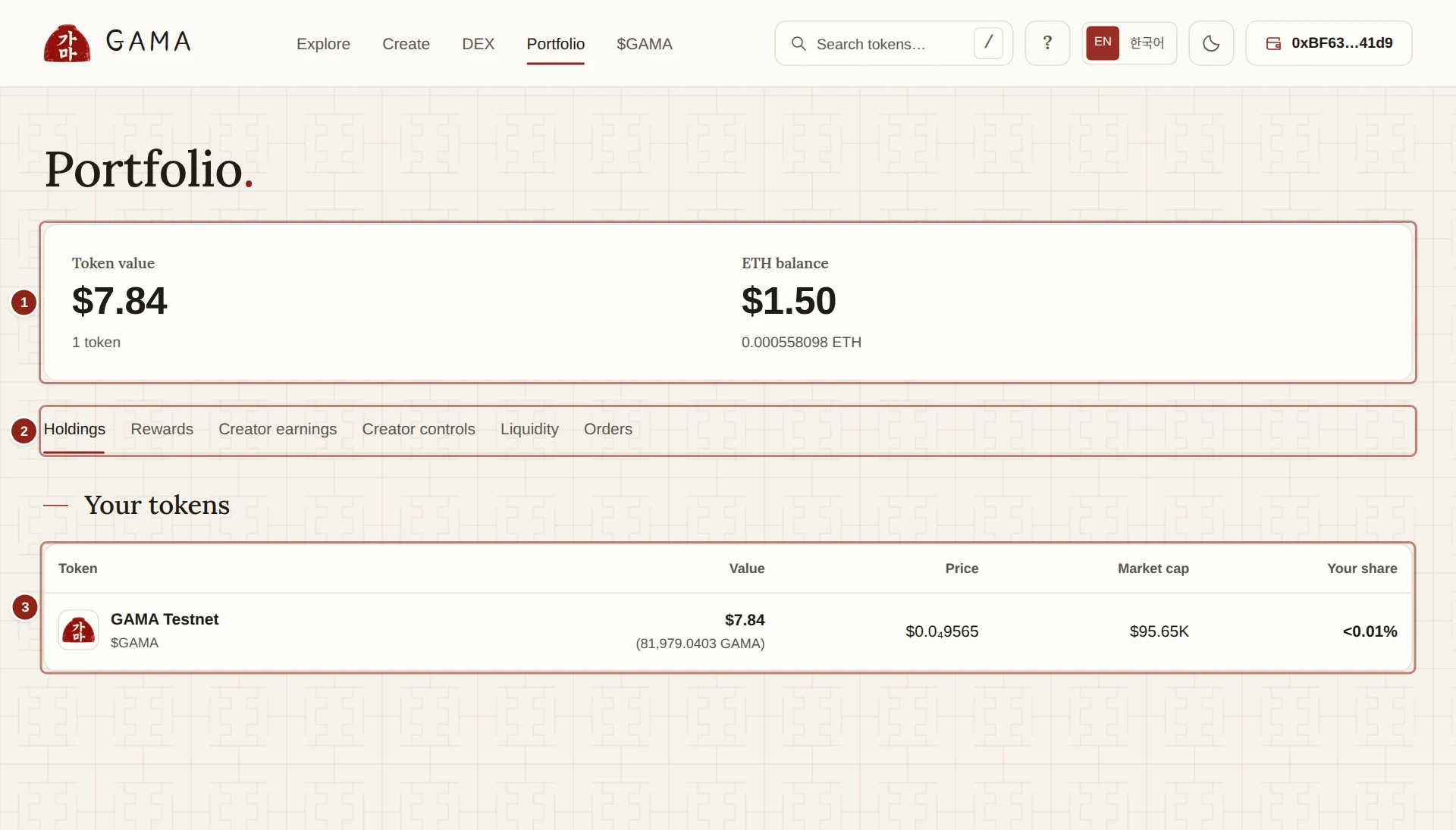
- Token value and ETH balance: the two figures at the top.
- Portfolio views: Holdings, Rewards, Creator earnings, Creator controls, Liquidity and Orders.
- Your tokens: every launch token your wallet holds.
The summary
- Token value is the dollar value of the launch tokens in your wallet, added up. Below it, the number of tokens, and how many have no price. A token without a price is left out of the total rather than guessed. While the list is still loading more pages, the heading reads Token value (loaded so far).
- ETH balance is the test ETH in your wallet, in dollars and in ETH.
Test ETH and test tokens have no real value. The dollar figures show what they would be worth at GAMA's own market prices, converted with an ETH/USD reference, so you can compare tokens with each other.
The views
The tabs under the summary switch between six views. Each view has its own web address, so you can bookmark it or share it, for example gama.win/portfolio?view=rewards.
| View | What it shows | Explained in |
|---|---|---|
| Holdings | The launch tokens you hold | This page |
| Rewards | Holder rewards from reward-mode tokens | Your rewards |
| Creator earnings | Fees credited to your wallet, and their payments | Creator controls and earnings |
| Creator controls | The tokens whose fees come to your wallet | Creator controls and earnings |
| Liquidity | Your GAMA DEX positions | Pools and positions |
| Orders | Your limit and DCA orders | Your orders |
Your tokens
The Holdings view lists every token launched on GAMA that your wallet holds, one row each:
- Token: the name and $ticker. Select it to open the token's page.
- Value: what you hold, in dollars first and then in the token's own units.
- Price: the token's price in dollars.
- Market cap: the price times the tokens in circulation.
- Your share: your balance as a share of the tokens in circulation.
Prices come from the token's own market on GAMA: its bonding curve while it is on the curve, and its pool after graduation. Tokens burned to the dead address are not in circulation, so they count in neither the market cap nor your share. For example, if 10,000,000 tokens of a launch sit in your wallet and none of its 1,000,000,000 tokens are burned, Your share reads 1%.
The list shows launch tokens only. Your ETH is in ETH balance, and other tokens, such as WETH, are not listed. If you hold none, the view says "You don't hold any launch tokens yet. Explore tokens to find one."
TIP
Tokens that wait in an order vault, and tokens inside your liquidity positions, are not in your wallet, so they are not in Holdings. See them under Orders and Liquidity.