
Limit orders
A limit order buys or sells a token only when the price reaches a level you set. You fund it in full when you place it; your funds wait in your own order vault until it fills, and you can cancel it at any time. GAMA's keepers watch the price and fill the order for you. A limit order works on tokens still on their bonding curve and keeps working after they graduate.
Place a limit order
Open DEX, then Limit on the trading card. With no token chosen, the card is set to buy GAMA.
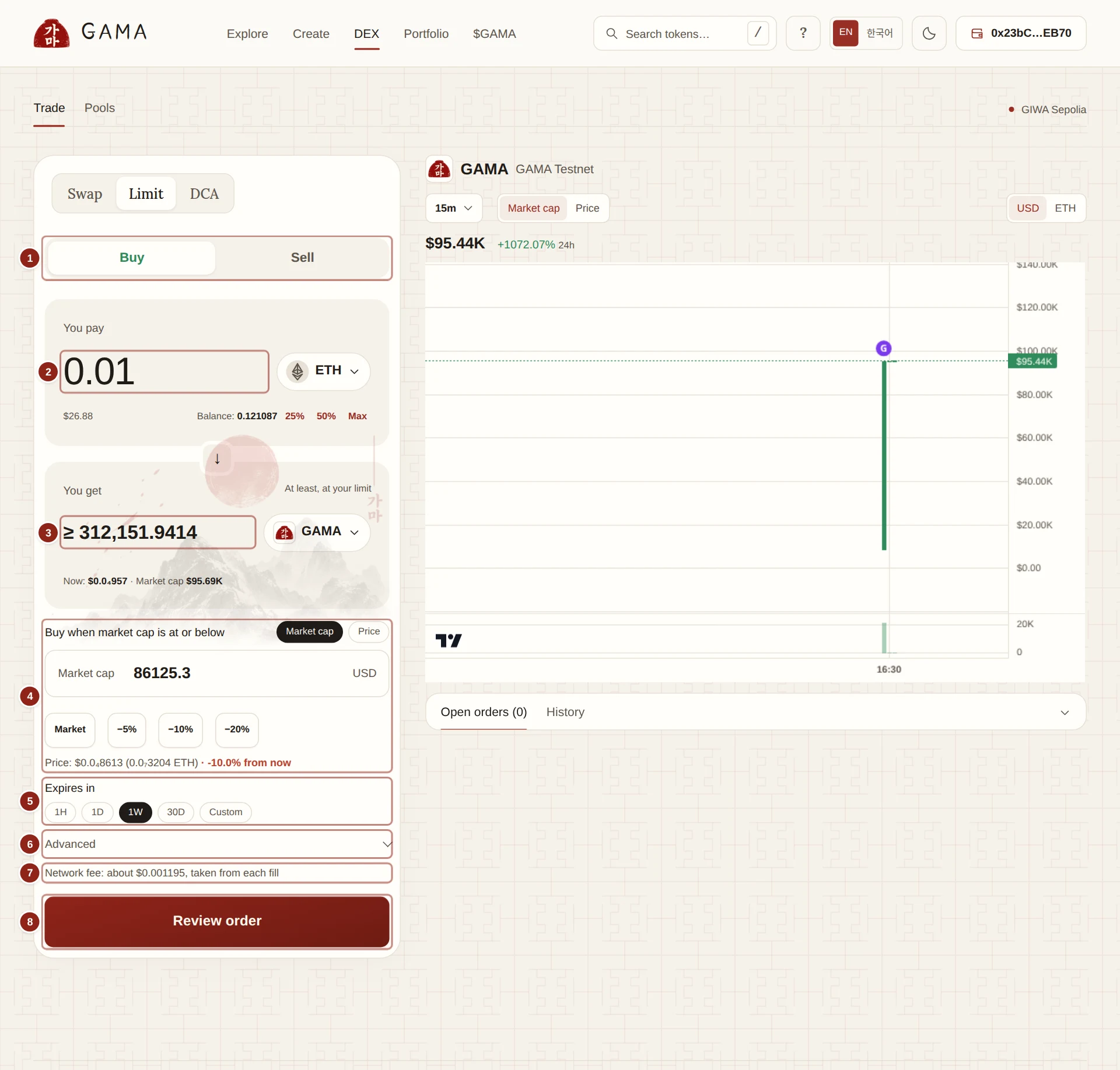
- Buy or Sell: the side of the order.
- You pay (or You sell): the amount you put into the order, with your balance.
- You get: the least you receive at your limit.
- The limit: the price or market cap at which the order fills.
- Expires in: how long the order stays open.
- Advanced: when the order starts, and WETH instead of ETH.
- Network fee: the keeper's charge, taken from each fill.
- Review order: opens the summary before your wallet.
- Choose the tokens with the token buttons, then Buy or Sell.
- Type the amount in You pay (for a buy) or You sell (for a sale), or click 25%, 50% or Max.
- Set the limit. The field reads, for example, Buy when market cap is at or below or Sell when price is at or above. Switch between Market cap and Price above it. Limits are in US dollars when a dollar price is known, otherwise in the paired asset; GAMA converts a dollar limit into the paired asset when you place the order, and the order keeps that asset price from then on.
- Market, −5%, −10% and −20% (or +5%, +10%, +20% for a sale) fill in a limit from the current price.
- The line below shows the matching price or market cap and how far it is from now, for example "−10.0% from now".
- A buy limit must be at or below the current price, and a sell limit at or above it.
- You get now shows "At least, at your limit" and the amount.
- Choose Expires in: 1H, 1D, 1W (the default), 30D or Custom.
- Optional, under Advanced: Starts (Now, In 1h, In 24h or Custom), and Receive WETH instead of ETH when you are selling for ETH.
- Click Review order. Check You pay, You get at least, When, Expires and Fees, and under Details the Route and Order contract.
- Click Place order and approve in your wallet. For a token you pay with, the wallet first asks you to approve exactly the order's amount. ETH goes with the order itself.
Here is a DCA order being placed on Gamascan; a limit order looks the same, sending your funds to your vault.
How a limit order fills
- Only at your price or better. Every fill must give you at least what your limit promises for the amount it spends. A fill that would not is refused by the order contract.
- In parts. A limit order can fill in several parts as the price allows. Each part spends at least a minimum fill that GAMA sets for you: at least a twentieth of the order, and large enough that the network fee stays a small share of it. When what is left is smaller than that, it comes back to your wallet straight after the fill.
- By GAMA's keepers. Only GAMA's keepers can fill your order (the order contract also accepts a fill from you). No one else can push the price to your level and fill it themselves, so a better price stays with you. See How orders fill.
- Across graduation. An order on a token still on its curve keeps filling in the token's pool after it graduates.
- Not guaranteed. If the price never reaches your limit before the order expires, nothing fills, and you take your funds back.
Each fill pays a small network fee to the keeper that carried it out, taken from the fill itself, never more than the order's Network fee limit per fill. See How orders fill.
TIP
While a token is on its curve, a buy order counts against your own wallet's buy limit. If your wallet is at the limit, fills wait, and go ahead once you have room again or the token graduates.
Your orders
Your orders appear under the chart on the DEX page, and on Portfolio › Orders. Open orders lists the orders still running; History lists finished ones.
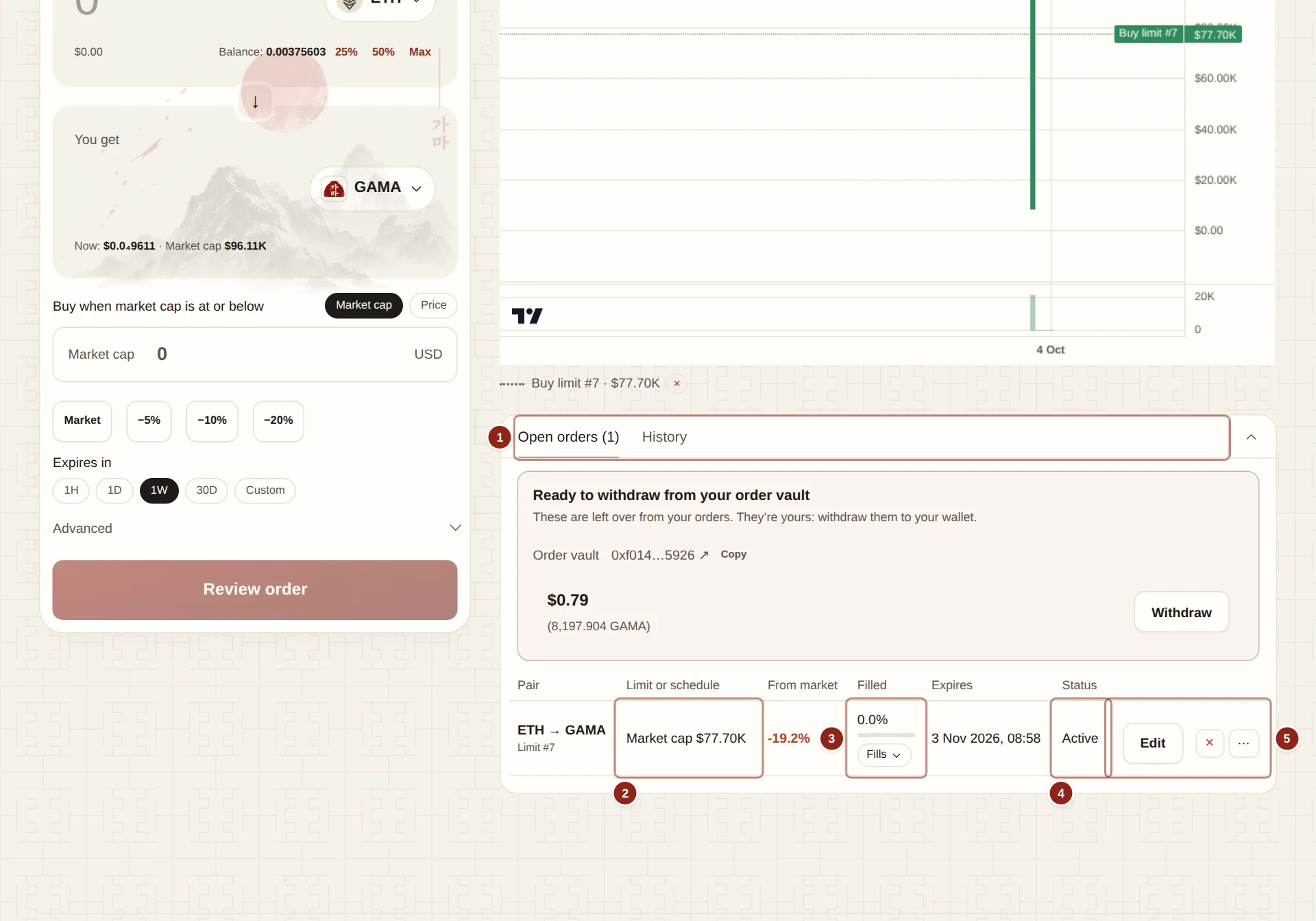
- Open orders and History.
- Limit or schedule: your limit, as a price or a market cap.
- Filled: how much of the order has filled, with its fills.
- Status: where the order stands, and why it is waiting.
- The actions: Edit, × to cancel, and ⋯ for the details.
The Status column shows Active, Scheduled (not started yet), Paused, Completed, Cancelled or Refund available, and a line on what the order is doing now: Waiting for your price, Filling now, Waiting: network fees are high or Waiting: your wallet is at the buy limit. From market shows how far your limit is from the current price.
Your open limits also appear on the token's chart under Your active limits, each as a line you can cancel with its ×.
Edit, pause or cancel
You can change your order at any time, without the keeper. Each change is a transaction from your wallet.
- Edit › Edit price or expiry: enter a New limit price (optional) or a New expiry (optional) (Keep, 1H, 1D, 1W or 30D). A new expiry counts from now. Leave a field empty to keep it.
- ⋯ › Pause order stops future fills; Resume order allows them again. Your funds stay refundable while paused.
- × › Cancel and refund returns everything not yet spent to your wallet. If you paid with ETH and your wallet cannot receive ETH, choose Refund as WETH instead.
- Raise network fee limit appears when network fees are above what your order allows per fill.
When an order expires with funds unspent, its status becomes Refund available and a Refund button returns them.
WARNING
A worse limit price lets your order fill at a worse price. Check the new limit before you confirm an edit.