
DCA orders
A DCA order (dollar-cost averaging) spreads one purchase over time: it buys a fixed amount at regular intervals, at the market price each time, until its budget is spent. It can also sell a token in equal parts. You fund the whole budget when you place the order; it waits in your own order vault, and GAMA's keepers make each buy for you.
A DCA order works on tokens still on their bonding curve and carries on in the token's pool after it graduates.
Set up a DCA order
Open DEX, then DCA on the trading card. With no token chosen, the card is set to buy GAMA.
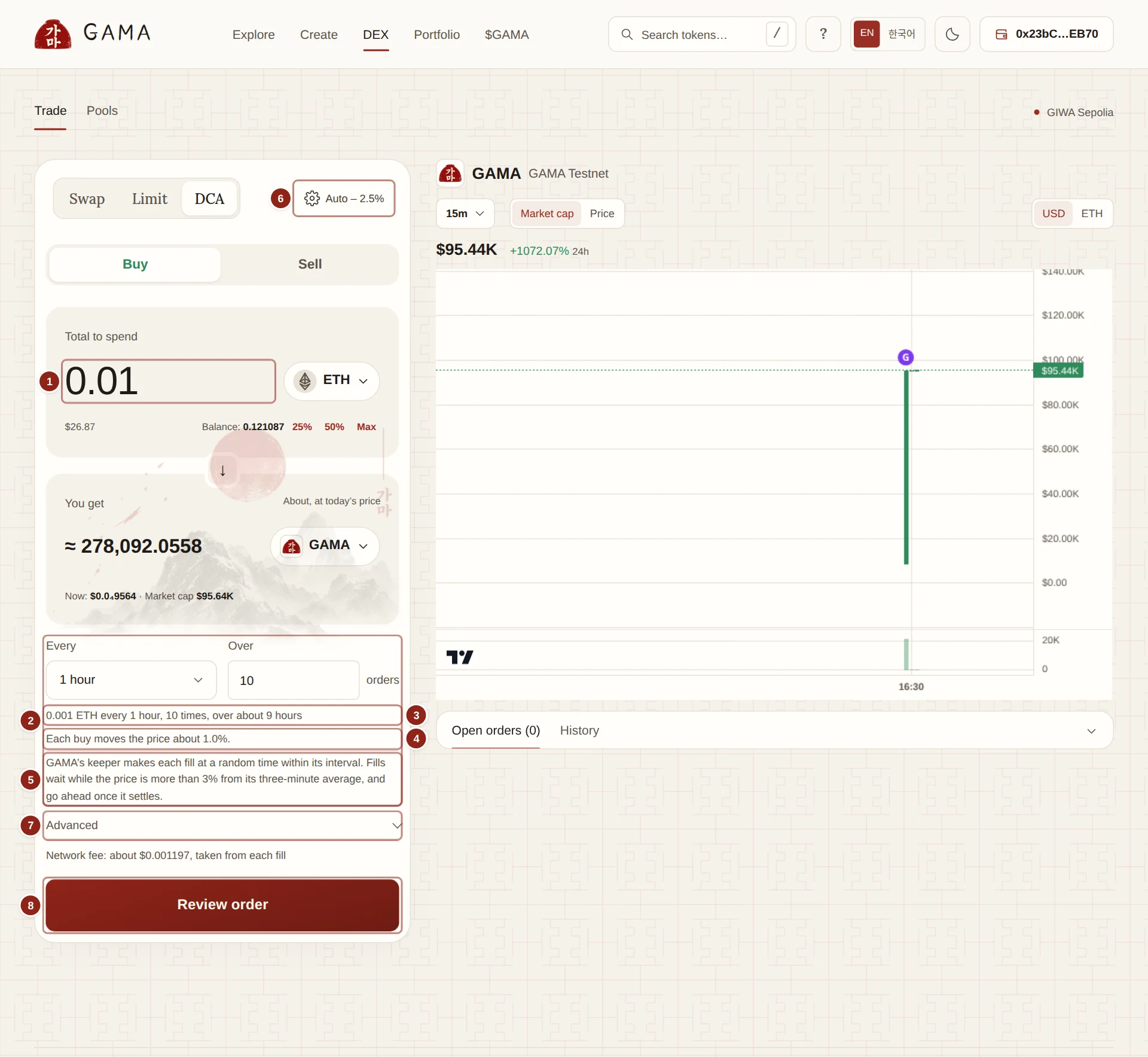
- Total to spend: the whole budget of the order.
- Every and Over: how often it buys, and how many buys.
- The schedule in words: how much each buy spends, and over how long.
- How much each buy moves the price.
- How GAMA's keeper fills the order.
- The slippage allowed on each buy, Auto by default.
- Advanced: start time, an optional price limit and WETH.
- Review order: opens the summary before your wallet.
- Choose the tokens with the token buttons. Buy spends ETH (or the token you choose) on the other token; Sell sells a token in parts.
- Type the budget in Total to spend (or Total to sell), or click 25%, 50% or Max.
- Choose Every: 5 min, 15 min, 1 hour (the default), 4 hours, 1 day, 1 week, or Custom in minutes, hours or days. The shortest interval is one minute.
- Choose Over how many buys: from 2 to 100 (10 by default). The budget is split into equal buys; the last one takes whatever is left.
- Read the line below, for example "0.01 ETH every 1 hour, 10 times, over about 9 hours", and Each buy moves the price about …%. When one buy would move the price by more than 10%, the form suggests more, smaller buys.
- Check the slippage at the top of the card. Auto covers each buy's own price impact plus room for the price to move. See Slippage and price impact.
- Optional, under Advanced:
- Starts: Now, In 1h, In 24h or Custom.
- A price limit: Pause buying when market cap is above or Pause buying when price is above (for a sale, Pause selling when … is below). Buys wait while the market is past it.
- Receive WETH instead of ETH, when you are selling for ETH.
- Click Review order. Check You pay ("10 buys of 0.01 ETH"), You get about at today's price, When ("Every 1 hour, 10 times"), Expires and Fees, and under Details the Route and Slippage per buy.
- Click Place order and approve in your wallet. A token budget first needs an approval of exactly that amount.
The order ends after its last interval: its expiry is its start plus the number of buys times the interval.
How the buys happen
The form says it plainly: "GAMA's keeper makes each fill at a random time within its interval. Fills wait while the price is more than 3% from its three-minute average, and go ahead once it settles." In short:
- One instalment per interval. Each interval buys at most its instalment. The keeper may split it into several smaller fills when one fill would move the price too much; together they never exceed the instalment.
- A random moment. The keeper fills at a random time inside each interval, not at its start, so no one can know when your buy will land.
- Protected prices. A buy waits while the price is more than 3% away from its three-minute average, and no single fill may move the price by more than 1%. Your slippage applies on top.
- Shared trades. Orders that buy the same token by the same route can fill together, in one trade at one price.
All of this is explained in How orders fill, with examples from the live release.
WARNING
A route through a pool that is not a GAMA launch pool has no price average. For such a route the form asks for your own price limit: "This route goes through a pool without GAMA's price average, so a market order needs your own price limit."
Missed intervals
A buy that cannot fill before its interval ends is skipped. Skipped buys are not made up later: the order does not buy twice in the next interval. A buy is skipped when, until the interval ends:
- the price stays more than 3% away from its three-minute average;
- the price is past your price limit;
- the market is too thin to fill within your slippage;
- or your wallet is at a token's buy limit while it is on its curve.
What a skipped buy would have spent stays in your order. If the order ends with money unspent, the status reads "Ended with … unspent" and a Refund button returns it.
Follow your order
Your DCA orders appear under Your orders on the DEX page and on Portfolio › Orders. The Limit or schedule column shows "Every 1 hour", and Status shows what the order is doing:
- Next buy with a time, or Not due yet, between buys;
- Filling now;
- Waiting: the price is more than 3% from its average;
- Waiting: network fees are high;
- Waiting: your wallet is at the buy limit;
- Not filling: slippage too low: each buy would move the price more than your slippage. Cancel and place the order again with more slippage or more, smaller buys.
When buys were skipped, the status adds "1 buy did not fill" or "… buys did not fill".
Click the fills count under Filled to see every fill:
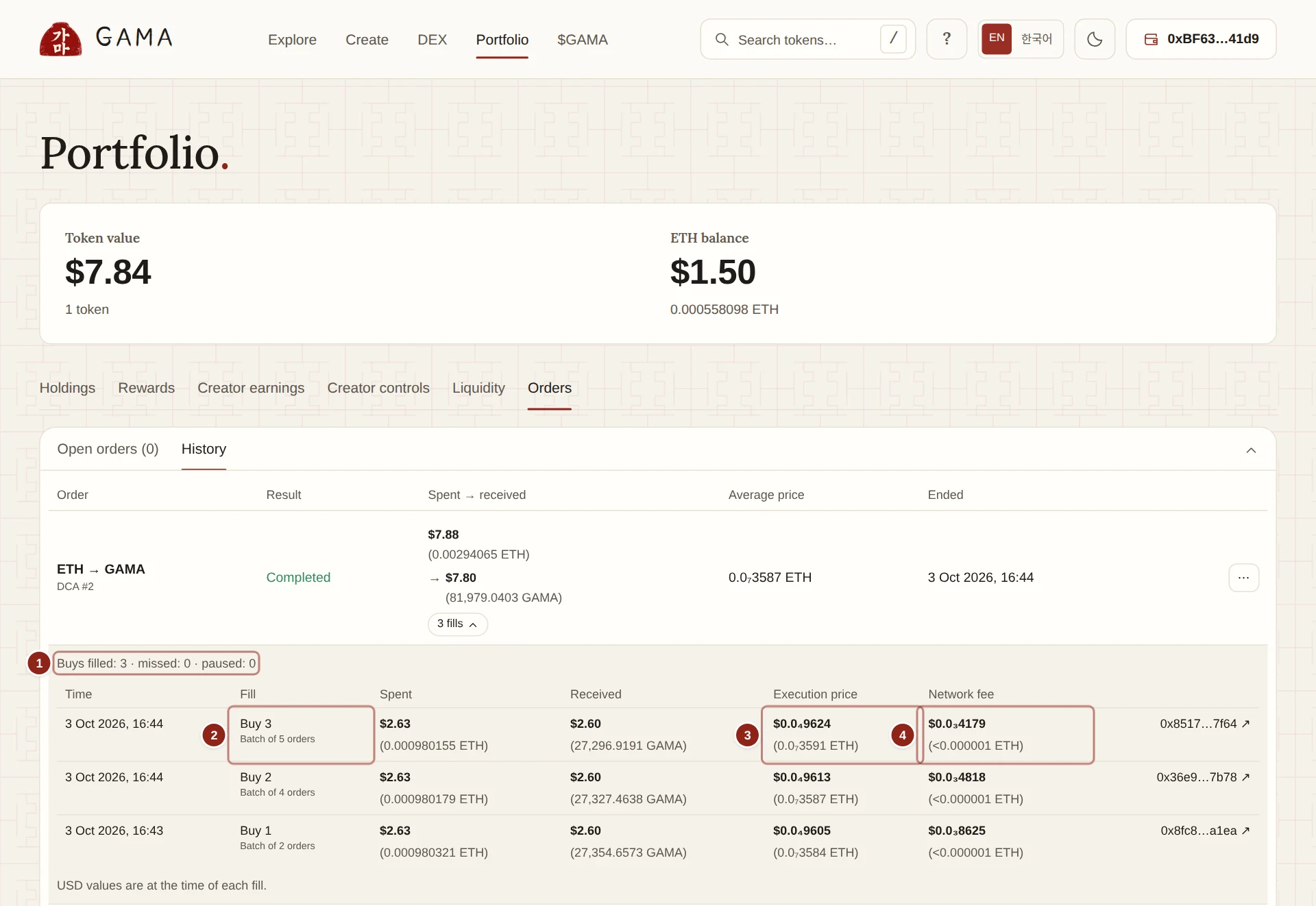
- The count: buys filled, missed and paused.
- Fill: which buy it was, such as Buy 2 · part of 2 fills, and Batch of 5 orders when it shared a trade.
- Execution price: the price this fill paid.
- Network fee: the keeper's charge for this fill.
Rows such as Buy 3: no fill mark intervals that were missed or paused. Dollar values are at the time of each fill.
Edit, pause or cancel
As with a limit order, you can Edit the price limit or expiry, Pause order and Resume order, Raise network fee limit, or Cancel and refund, at any time and without the keeper. A cancelled DCA order returns its whole unspent budget. See Limit orders.