
Your first trade
This page walks you through buying a token that is still on its bonding curve, then selling it again. You need a connected wallet on GIWA Sepolia with a little test ETH; see Connect a wallet and get test ETH. A buy of 0.01 test ETH is plenty for a first try.
Pick a token
- Open Explore and pick a token whose card shows a progress bar rather than Graduated. Or use Search tokens in the header.
- On the token page, check the tag next to its ticker. On curve means it is still selling on its bonding curve, which is what this page covers. A Graduated token trades in its pool instead; the steps are the same.
- Check the paired asset. Most tokens are priced in ETH; if the trade panel shows another asset under You pay, you need some of that asset to buy.
WARNING
Anyone can launch a token with any name. A token called "GAMA" is the real GAMA token only if it carries the Official badge. See The official seal.
Buy
The trade panel sits beside the chart (on a phone, tap Buy / Sell at the top to jump to it).
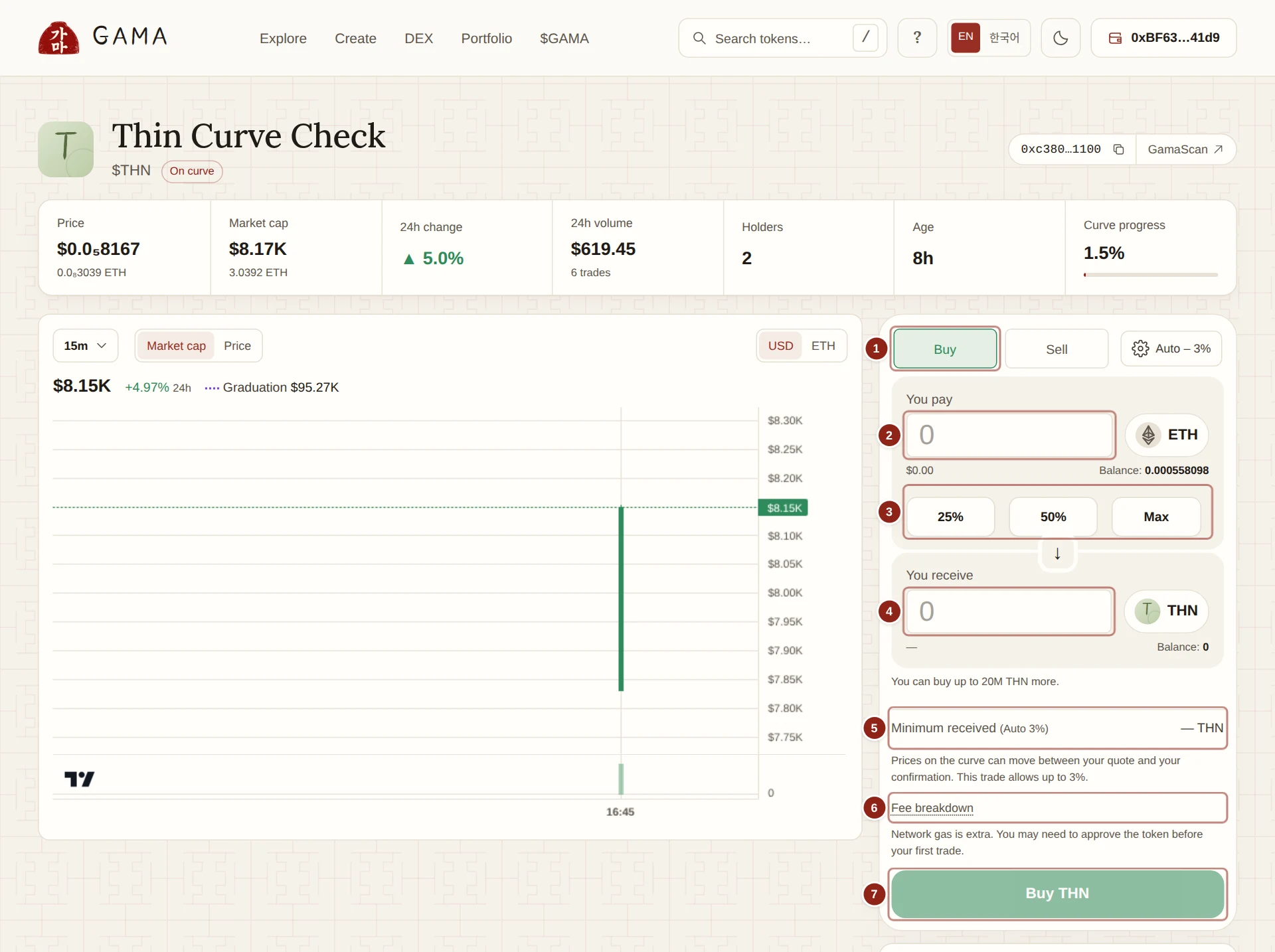
- Buy: the side you are trading. Switch to Sell later to sell.
- You pay: the amount of ETH (or the token's paired asset) you spend.
- 25%, 50%, Max: a share of your balance. Max leaves enough ETH for gas.
- You receive: the tokens the current quote gives you, after fees.
- Minimum received: the least you accept. If the price moves further, the trade fails instead.
- Fee breakdown: every fee this token charges, and who receives it.
- Buy and the ticker: sends the trade to your wallet.
- Make sure Buy is selected.
- Type an amount in You pay, for example
0.01. You can also type the number of tokens you want in You receive, and the form works out what to pay. - Wait for the quote. You receive fills in, and the lines below it update.
- Check the details:
- Minimum received shows the tokens you get at worst, and the slippage in brackets, for example (Auto 3%). See Slippage and price impact.
- Fees shows the fees in ETH for this trade. Open Fee breakdown to see the rates: on a standard token, a 1% trading fee (70% to the creator, 30% to GAMA) and any creator tax; on a reward-mode token, 1% to GAMA and a holder fee shared by holders.
- Price impact, including fees shows how much worse your average price is than the current price, fees included.
- A note such as "You can buy up to … more" shows your room under the buy limits: while a token is on its curve, each buy and each wallet can take up to 2% of the supply.
- Click Buy followed by the token's ticker.
- Your wallet opens. Check the amount and confirm. Buying with ETH needs only this one transaction.
The form shows Waiting for confirmation…, then Transaction confirmed. Live data is up to date. Under the trade panel, Your position now shows your Holding. Your trade appears at the top of the Trades tab with a link to Gamascan. Here is a buy of 0.055 test ETH on a fresh launch as it looks there.
TIP
If the quote cannot keep up with the price, the trade fails rather than fill at a worse price. You lose only the small network fee. Get a fresh quote and try again, or raise the slippage a little.
Sell
Switch the panel to Sell. You pay is now the token, and You receive is ETH.
Type an amount of tokens, or click Max to sell everything you hold.
Check Minimum received, the fees and the price impact as before. Selling is never limited.
Click Sell followed by the ticker.
Your wallet asks for two transactions:
- an approval, which lets the trading contract take exactly the tokens you are selling, and nothing more;
- the sale itself.
Confirm both. An approval on its own trades nothing. Because it covers only this sale, your next sale asks for a new one.
When the form shows Transaction confirmed, the ETH is in your wallet.
Here is a sale of a launch's tokens back to its curve on Gamascan.
What happens to the price
Every buy on a curve raises the token's price a little, and every sale lowers it. The chart above the panel shows it, together with your trade. On a curve with little bought yet, even a small buy can move the price noticeably; Price impact, including fees tells you by how much before you confirm.
If your buy is bigger than what is left on the curve, you buy only what is left and get the rest of your ETH back in the same transaction. That buy completes the sale, and the token graduates.
If something goes wrong
- "Quote unavailable for this amount": change the amount or wait for a new quote.
- "Quote expired": the quote is older than 30 seconds. Wait a moment for a fresh one.
- "This buy is over the limit": lower the amount to the figure the form shows.
- "Insufficient ETH for this transaction and its estimated gas": lower the amount or add test ETH.
- A transaction seems stuck: check it on Gamascan before trying again, so that you do not trade twice.