
Your orders
The Orders view in Portfolio lists your limit and DCA orders: what is still open, how each one is filling, every fill, and the orders that have finished. The same panel sits under the chart on the DEX page. This page goes through what it shows; placing orders is explained in Limit orders and DCA orders.
The panel
Select Portfolio, then Orders. The panel has two tabs, Open orders with their number, and History. The arrow at its right folds the panel away; the app remembers that choice.
When your order vault holds something you can take back, a box at the top says Ready to withdraw from your order vault, with Withdraw for leftover funds and Claim vault rewards for holder rewards earned by tokens waiting in the vault.
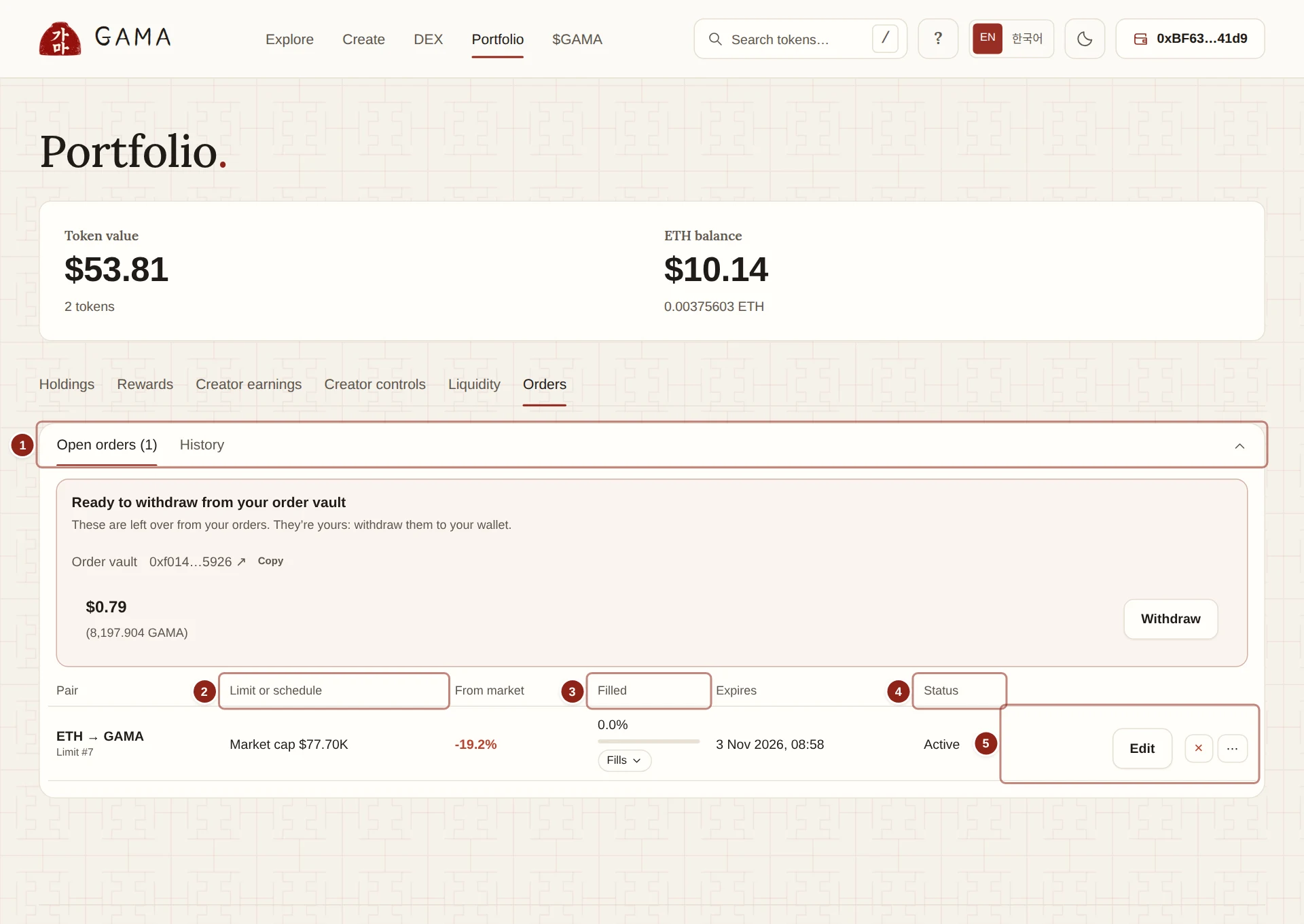
- Open orders and History: the two tabs, and the arrow that folds the panel.
- Limit or schedule: a limit order's price, or a DCA order's interval.
- Filled: how much of the budget has filled, what it bought, and the list of fills.
- Status: the order's state, and why it is or is not filling right now.
- Edit, cancel and details: change, cancel or open the order.
Open orders
Each row is one order:
- Pair: what you pay and what you receive, such as ETH → GAMA, with Limit or DCA and the order number.
- Limit or schedule: for a DCA order, how often it buys, such as "Every 1 hour", and its price limit if it has one, or Market price. For a limit order, its limit, shown as a market cap or a price.
- From market: how far the limit is from the current price.
- Filled: the share of the budget spent, a bar, what it spent and received so far, and a button with the number of fills that opens them.
- Expires: when the order ends.
- Status: Active, Scheduled, Paused, Refund available or Completed.
Under the status, a short line says what is happening now, checked every 30 seconds:
| Line | Meaning |
|---|---|
| Filling now | The order can fill now. GAMA's keeper, the service that fills orders, will fill it. |
| Next buy and a time | The DCA order's next buy is due then. |
| Not due yet | Nothing is due in the current interval. |
| Waiting for your price | The market has not reached your limit. |
| Waiting: the price is more than 3% from its average | The price has moved more than 3% from its three-minute average. Fills wait until it settles. |
| Waiting: network fees are high | A fill would cost more network fee than the order allows. |
| Waiting: your wallet is at the buy limit | The token is still on its curve and your wallet has reached its 2% limit. |
| Not filling: slippage too low | The next buy would move the price more than your slippage allows. |
Some lines come with a note and a button, for example Raise network fee limit. See How orders fill for the rules behind them.
Actions
- Edit opens Edit price or expiry: a New limit price (optional), for a DCA order also Remove the optional price limit, and a New expiry (optional) of 1H, 1D, 1W or 30D, counted from now. Leave a field empty to keep it.
- × is Cancel and refund: it stops the order and returns the remaining budget to your wallet.
- Refund appears on an order that has expired, to take back what it did not spend.
- ⋯ opens the Order details: Remaining budget, Received so far, You get at least (rest of order), Next buy, Slippage per buy, Expires, the Order vault address, Pause order or Resume order, and the order's history, such as Order placed, Fill confirmed and Order edited, each linked to GAMASCAN.
You can pause, edit and cancel an order yourself at any time. None of these needs GAMA's keeper.
Fills
Select the fills button in Filled, such as "3 fills", to list every fill of the order, newest first:
- Time, Spent and Received, with the dollar value at the time of each fill.
- Fill: for a DCA order, which buy it was, such as "Buy 2".
- Execution price: the price that fill got, in dollars and in the paired asset.
- Network fee: what the fill paid the keeper for its network fee.
- The transaction on GAMASCAN.
Above the list, a DCA order shows a count such as "Buys filled: 3 · missed: 0 · paused: 0".
Batches
Orders that buy along the same route can be filled together in one trade, at one price. Each such fill is marked Batch of 5 orders, for example, and each order pays only its share of the keeper's network fee. On the testnet, five DCA orders into GAMA's pool were filled together in one trade; each order in it paid about a third of the network fee it paid when filled alone.
Split fills
A fill may move the price by at most 1% on its own. When one DCA buy is larger than that in a thin market, the keeper splits it into several fills within the same interval, and each part is marked, for example, "Buy 2 · part of 2 fills". The parts add up to at most one buy; what an interval leaves unfilled is not carried forward. On the testnet, a 0.06 ETH buy on a fresh launch was filled as 0.0321 ETH here and 0.0279 ETH here.
Missed buys
A DCA buy is skipped when its interval ends while the price is more than 3% from its three-minute average, past your price limit, or too thin to fill within your slippage. Skipped buys are not retried later. The fill list shows the gap, such as "Buy 3: no fill", and the order shows "1 buy did not fill". An order whose buys keep missing tells you so and suggests refunding the rest and placing a new order.
Filled by you marks a fill you made yourself as the order's owner.
History
History lists finished orders:
- Order: the pair, the kind and the number.
- Result: Completed, Cancelled, Cancelled after 2 fills, or Expired, refunded, and any buys that did not fill.
- Spent → received: the totals, with the fills button, or Nothing filled.
- Average price: what the order paid on average, in the paired asset.
- Ended: when it finished.
⋯ opens the order's history of events.