
A tour of the app
The GAMA app at gama.win has five main areas, all reached from the header: Explore, Create, DEX, Portfolio and $GAMA. This page shows where everything is. You can browse every page without connecting a wallet.
The header
The header stays at the top of every page.
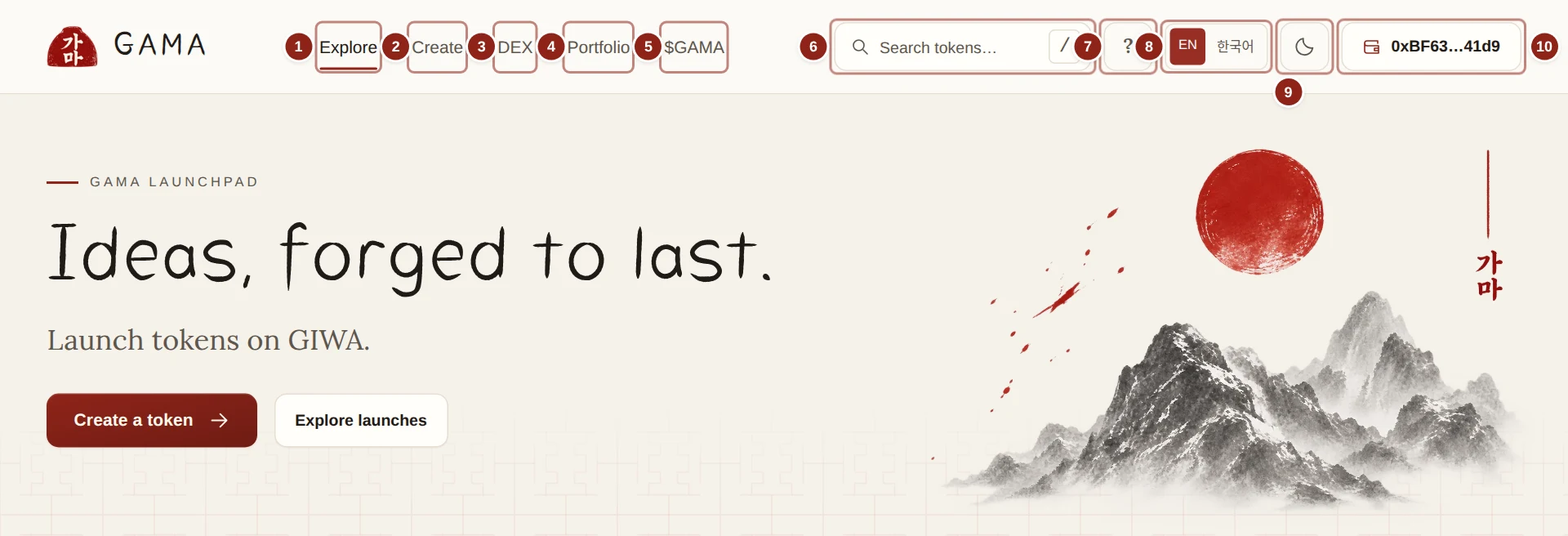
- Explore: the home page, with live launches.
- Create: the form to launch a token.
- DEX: swaps, limit and DCA orders, and pools.
- Portfolio: everything your wallet holds and has earned on GAMA.
- $GAMA: the GAMA token, its buybacks and burns.
- Search tokens: finds a token by name, ticker or address.
- ?: GAMA's short in-app guide, How GAMA works.
- EN / 한국어: the language switch.
- The theme button: light or dark.
- Your wallet: Connect wallet, or your address once connected.
Explore
The home page. Live launches lists tokens as cards or as a list, with three views: Newest, Trending and Top gainers. Each card shows the token's market cap, its 24-hour change, its number of trades, its paired asset, its holders and a bar showing how close it is to graduating. Beside the list, Trending ranks tokens by recent volume and Top gainers by their price change over the last 24 hours. View all tokens opens the full list. Create a token and Explore launches at the top are shortcuts.
Create
The form for launching your own token: its name, ticker, image, links, mode, fees and paired asset, with a live preview of the exact terms. See Your first launch.
DEX
GAMA DEX has two views. Trade holds one trading card with three modes, Swap, Limit and DCA, with the chart of the token you are trading beside it and your orders below. Pools lists GAMA DEX pools and lets you create one or add liquidity. See Swapping and Pools and positions.
Portfolio
Your wallet's side of GAMA, once connected. At the top: Token value and ETH balance. Below, six tabs: Holdings, Rewards, Creator earnings, Creator controls, Liquidity and Orders. See Holdings.
$GAMA
The page of the GAMA token: how much GAMA has been burned, the fees waiting to buy GAMA, recent buybacks, and a button to Trade GAMA. See The GAMA page.
Search tokens
Type at least two letters of a name or ticker, or paste an address. Matches appear as you type, the official GAMA token first; Enter opens the full token list with your search. Press / anywhere to jump to the search box.
Docs, language and theme
The ? button opens How GAMA works, a short guide inside the app. These docs go into more detail. EN / 한국어 switches every page between English and Korean, and the theme button switches between light and dark. Both choices are remembered in your browser. On a phone, the language and theme buttons are inside Menu.
The token list
View all tokens on Explore opens Tokens: every GAMA launch, updated live.
- Search name, ticker or address narrows the list.
- The stage filters: All tokens, On curve, Graduating and Graduated.
- Paired asset shows only tokens priced in one asset, such as ETH.
- Sort by: Newest, Recent activity, 24h volume, Top gainers (24h), Market cap or Holders.
Market cap on GAMA is the price times the supply in circulation, leaving out burned tokens. It is not money held anywhere, and not what you would get by selling.
Token pages
Click any token to open its page: price, chart, trade panel, holders, fees and graduation progress, all in one place. Its address is gama.win/launchpad/token/ followed by the token's address. See The token page.
Rewards pages
Two pages show holder rewards:
- Your rewards: the rewards your wallet has received and can still claim. The same figures are on Portfolio › Rewards.
- Platform payouts: every holder reward paid by every reward-mode launch, in one place. The Holder payouts link in the footer opens it.
See Holder rewards.
The footer
At the bottom of every page: Docs, Holder payouts, Contact (an email to the team), Terms, Privacy, Disclaimer and GAMA on X. The last line names the network, GIWA Sepolia testnet.
When an earlier release of GAMA still holds tokens or orders, the footer also links to it as Older version: your tokens and orders. That version shows a banner: "You're on an older version of GAMA, where your earlier tokens and orders are kept." Go to the current site brings you back.